Reviewed September 24, 2026 against source v1.7.41. Features and fixes are labeled by version. Check release availability.
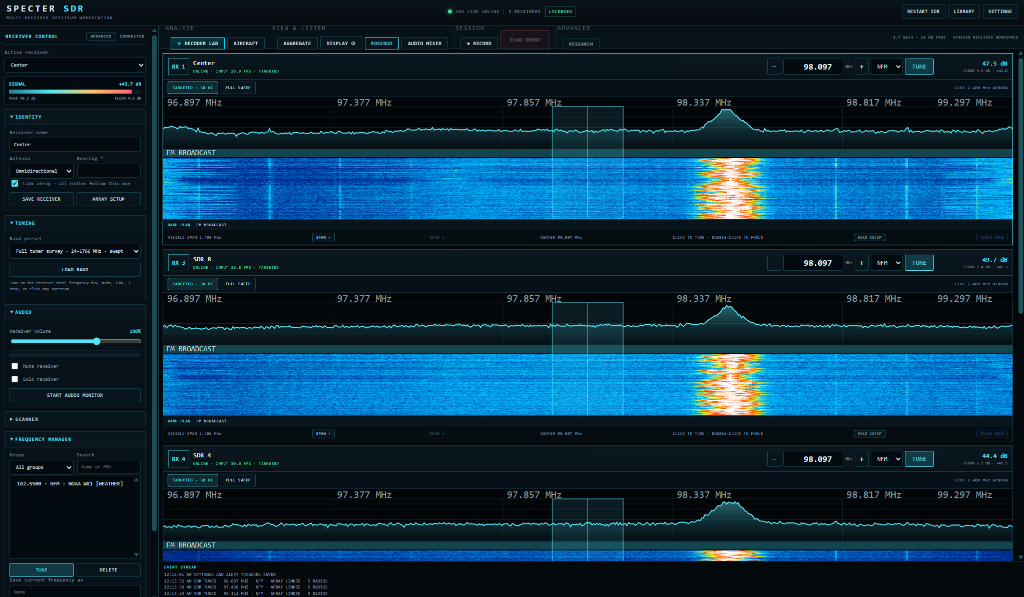
Command bar
| Group | Control | Purpose |
|---|---|---|
| Analyze | DECODER LAB | Open live protocol decoding. |
| Analyze | AIRCRAFT | Open the ADS-B map. |
| View & Listen | AGGREGATE | Show or hide the combined full-speed spectrum. |
| View & Listen | ROSEBUD | Open the radial array or second-display view. |
| View & Listen | AUDIO MIXER | Mix all receiver audio. |
| Session | RECORD / FLAG EVENT | Capture a session and mark important moments. |
| Advanced | RESEARCH | Open Pattern Hunter, Skywatch, and Search Director. |
The top-right header also provides RESTART SDR, LIBRARY, and SETTINGS.
Receiver cards and focus mode
Every live receiver has its own header controls, measured input frame rate, spectrum, waterfall, band plan, tuning mode, signal and floor readouts, span controls, and waveform holds.
Double-click a receiver canvas to expand it. Press × MULTI VIEW, or double-click again, to return to the stacked array.
Tuning and demodulation
Type a frequency and press Enter, click a point on the spectrum, or use the configured step controls. Supported modes are NFM, WFM, AM, DSB, LSB, USB, CW, and RAW.
Band presets include FM broadcast, AM broadcast, Airband, Weather Radio, Amateur 2 m, Amateur 70 cm, and the swept 24-1766 MHz tuner survey.
Targeted and Full Sweep
- TARGETED: holds one centre frequency and displays the configured instantaneous span, 2.4 MHz by default, at approximately 30 updates per second.
- FULL SWEEP: retunes across a wide range and builds the result in passes.
Aggregate full-speed spectrum
The aggregate panel combines the full 24-1766 MHz tuner range by assigning a non-overlapping slice to every connected receiver. With five radios, each covers roughly one fifth of the range, so a complete picture arrives about five times faster than a single-radio sweep.
- Press AGGREGATE in the command bar to show or hide it.
- Use × HIDE on the panel or the matching Settings checkbox for the same persisted control.
- Click a frequency in the aggregate to focus the receiver that owns that slice.
- If no radio is sweeping when the panel is enabled, the workstation starts a partitioned full sweep automatically.
Array-linked tuning
Enable Link array: all radios follow this one in the RADIO drawer to apply tuning, mode, bandwidth, gain, shift, filter, squelch, and burst detection changes to every connected receiver.
Waveform holds, bookmarks, and history
HOLD SETUP defines up to 12 frequency ranges with dB-over-floor thresholds. CLEAR HOLD clears captured peaks without deleting the setup. Bookmarks preserve named frequencies, and the 30 most recent completed scans can be run again.
Display and waterfall
| Control | Purpose |
|---|---|
| FFT floor / dynamic range | Set noise reference and visible contrast. |
| FFT zoom | Narrow the visible span from 1x to 16x. |
| Waterfall speed | Set scroll cadence from 1, fastest, through 8. |
| Palette | Choose SDR# Classic, Colorblind Blue / Gold, Viridis, Inferno, Grayscale, or Legacy SPECTER. |
| Contrast / gamma | Adjust colour aggressiveness and mid-tone weighting. |
| Peak hold | Retain the peak spectrum trace. |
Spectrum interpolation and waterfall colour mapping use WebGL2 on supported hardware. Software rasterizers are rejected automatically and use the faster cached canvas path instead. The aggregate status line reports WEBGL2 GPU or CANVAS FALLBACK.
Advanced workflow guides
- Frequency Manager, array scanner, priority channels, lockouts, and CTCSS
- SigMF IQ capture, playback, and rtl_tcp receivers
- SBS, Icecast, and rigctl network services
Audio mixer
The mixer creates a strip for every active receiver with volume, mute, solo, and a level meter, plus master output. START AUDIO MONITOR begins monitoring the selected receiver.
One-to-six-view Advanced Display
Open a separate Advanced Display with one to six synchronized tiles. Each can follow a different receiver and use Spectrum and Waterfall, Persistence, 3D Spectrum, 3D Waterfall History, Research 3D Terrain, or Spectrum Tunnel. Read the Advanced Display guide for layout and timeline controls.
Activity watch on a receiver card (v1.7.40+)
Use ACTIVITY WATCH beside PATTERN to watch the channel that receiver is tuned to. Settings > Alerts controls speaker playback, tone, dialog, recording, threshold, and hold time. This is a channel monitor, not a replacement for full-band scanning. Read Channel Activity Watch before enabling unattended recording.
Mixed-instrument workspace order
In v1.7.41, radios appear first, tinySA analyzers below the radios, and the Geiger strip at the bottom. This is display order only; it does not renumber saved slots or reassign scan slices. In v1.7.40 the Geiger strip's dedicated row is above the receivers. See Radiation Counter and Timeline and version availability.