Reviewed September 24, 2026 against source v1.7.41. Features and fixes are labeled by version. Check release availability.
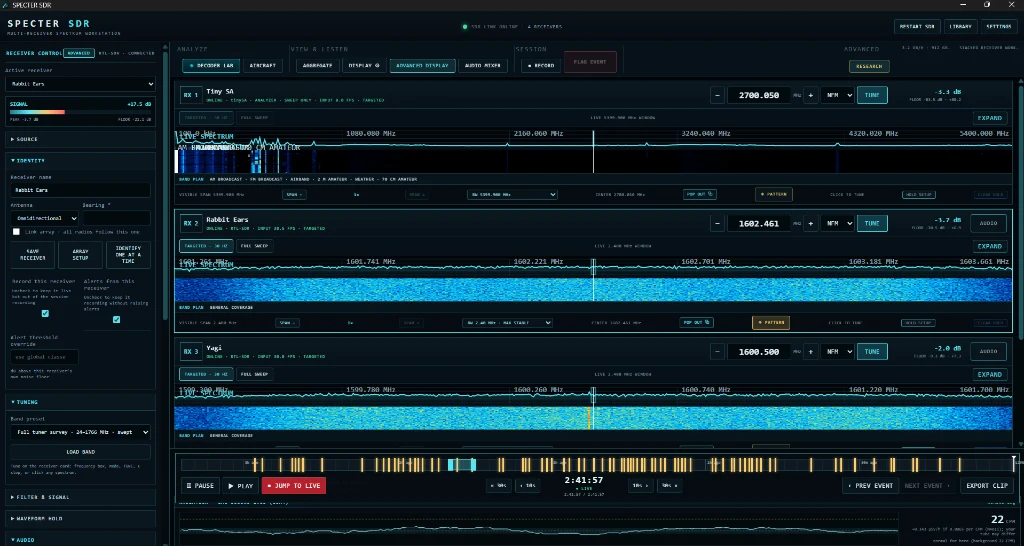
Current receiver families
| Family | Models and sources | Status and path |
|---|---|---|
| RTL-SDR | RTL2832U models including RTL-SDR Blog V3 and V4, NESDR, and compatible receivers. | Validated through the bundled librtlsdr runtime and WinUSB Interface 0. |
| bladeRF | bladeRF 1.x and bladeRF 2.0 micro. | Bundled pinned SoapySDR and bladeRF runtime with family-aware driver handling. |
| Remote | Network receivers served by rtl_tcp. | TCP source with forwarded frequency, sample rate, gain, AGC, and PPM controls. |
| TinySA | tinySA and tinySA Ultra family instruments that identify through the TinySA USB serial shell. | Supported as spectrum-only sources. SPECTER reads the device-reported sweep limits and adds the analyzer beside the radios. No audio, demodulation, IQ capture, or protocol decoding. |
| LimeSDR | LimeSDR Original and LimeSDR Mini integration. | Included through the pinned SoapySDR stack, but current Windows hardware validation remains in progress. Do not rely on LimeSDR for field evidence until a current release passes physical detection and streaming tests. |
TinySA is an instrument source, not an SDR receiver
A connected TinySA contributes measured power-versus-frequency sweeps to SPECTER's visual, timeline, recording, and alert pipeline. Its center frequency, span, sweep points, resolution bandwidth, attenuation, and LNA controls are instrument-specific. It does not provide audio, demodulation, IQ samples, coherent pairing, ADS-B, or Decoder Lab packets. See TinySA Spectrum Analyzer Setup.
One to eight receiver sources
SPECTER keeps persistent names, slots, antenna roles, bearings, tuning, gain, squelch, source settings, and DSP calibration. Local and remote receivers can share a workspace, but matched hardware is preferred when relative-amplitude direction comparison matters.
Bandwidth and sample rate
RTL-SDR devices use stable tuner-supported rates. Wider radios expose their own hardware-reported choices. SPECTER opens hardware conservatively and allows per-receiver source control. More bandwidth increases USB, CPU, FFT, recording, and storage load. Validate a rate for at least 30 seconds before an important session.
Driver safety
- RTL-SDR normally uses WinUSB on RTL2832U Interface 0.
- bladeRF follows the family-aware status and bundled runtime guidance shown by SPECTER.
- LimeSDR driver guidance is build-specific while validation continues. Do not force a generic driver change based on an RTL-SDR instruction.
Mixed-array planning
- Use matched radios, antennas, feed lines, gain, and rate for amplitude comparison.
- Use mixed hardware when coverage matters more than calibrated comparison.
- Assign stable identities and use powered hubs or separate USB controllers for larger arrays.
- Keep a dedicated ADS-B receiver out of general scan partitions.
Support evidence
Include the receiver family, exact model, device label, selected rate, active Windows driver, connection path, and relevant sidecar-log lines. Never post license keys or private rtl_tcp addresses publicly.
Identity and instrument boundaries
The v1.7.39 unique-serial command is for supported local factory-serial RTL-SDR dongles; it is not a generic EEPROM tool for LimeSDR, bladeRF, remote sources, or tinySA. Assign readable names to all sources, but follow each hardware family's identity and driver path.
Channel Activity Watch needs an audio-capable receiver. A GQ GMC radiation counter is a separate serial instrument with a CPM trace, not another SDR receiver.